I found a LPE bug on my own machine
Last month, I tried to find local privilege escalation bug on my Windows machine and it is quite funny, my daily device I use for every task with cyber security is so damn vulnerable to all kind of bugs but today I will only write about the first and most critical one I found which is Terabox. Terabox is a storage solution and it is cloud-based 
Enumeration
My flow of finding LPE is quite simple, for a device with a ton of 3rd party applications, definitely we should start with something easier and more obvious to find first. SysInternals tools should be more than enough for this task.
Procmon & Process Hacker (not SysInternal but we will need it)
For Procmon, I just turn it on, apply the filter for each process that match with the application that I installed on my machine and I start all of them to start looking for DLL hijack. After that, Process Hacker is for monitoring and observe whether that app runs with a “better” token than the principal starting the application.
Well, this is not that great as I doesn’t find anything useful for privesc, but some of them is outdated and vulnerable to exist CVEs so I updated them anyway lol.
Autorun
1
2
3
4
5
6
7
8
9
10
11
12
13
14
15
16
17
18
19
20
21
22
23
24
25
26
[SNIP]
   embeddedmode
     %SystemRoot%\System32\svchost.exe -k LocalSystemNetworkRestricted -p
     Embedded Mode: The Embedded Mode service enables scenarios related to Background Applications.  Disabling this service will prevent Background Applications from being activated.
     Microsoft Corporation
     10.0.26100.7019
     c:\windows\system32\embeddedmodesvc.dll
     2/20/1967 1:19 AM
   EntAppSvc
     %systemroot%\system32\svchost.exe -k appmodelRedirectionGuard -p
     Enterprise App Management Service: Enables enterprise application management.
     Microsoft Corporation
     10.0.26100.7019
     c:\windows\system32\enterpriseappmgmtsvc.dll
     11/11/2022 11:00 PM
   EventLog
     %SystemRoot%\System32\svchost.exe -k LocalServiceNetworkRestricted -p
     Windows Event Log: This service manages events and event logs. It supports logging events, querying events, subscribing to events, archiving event logs, and managing event metadata. It can display events in both XML and plain text format. Stopping this service may compromise security and reliability of the system.
     Microsoft Corporation
     10.0.26100.7019
     c:\windows\system32\wevtsvc.dll
     2/17/1973 2:03 PM
   EventSystem
     %SystemRoot%\system32\svchost.exe -k LocalService -p
     COM+ Event System: Supports System Event Notification Service (SENS), which provides automatic distribution of events to subscribing Component Object Model (COM) components. If the service is stopped, SENS will close and will not be able to provide logon and logoff notifications. If this service is disabled, any services that explicitly depend on it will fail to start.
[SNIP]
I used Autorunsc64 (a 64-bit cli version of Autorun) to find every services and the binary path for each of them, when I got the output, I would look into these kind of things:
- Which principal does the service start as ?
- Does the binary in binary path exist ?
- Does the path has weak permission ?
- Can we start the services as the lowpriv users ?
Well this is very interesting, there is an application which was installed about 3 months ago has the following binary path:
1
2
3
PS D:\SI\Autoruns> .\Autorunsc64.exe -accepteula -a s | findstr /i "D:\"
     D:\Courses\TeraBox\YunUtilityService.exe
     d:\courses\terabox\yunutilityservice.exe
My PC has 2 drives, C Drive is for Windows things and D Drive is for games and the course materials that I installed. If you familiar with Windows, you can tell that C root folder would be a lot more secure than other drive root folder by default. However, before I attempt to exploit this, there is a few more things I need to be ensure, what service is this ? which user this service run as ?
1
2
3
4
5
6
   TeraBoxUtility
     D:\Courses\TeraBox\YunUtilityService.exe
     TeraBoxUtility: TeraBox Service used To quickly apply for disk space
     Flextech Inc.
     1.37.0.6
     d:\courses\terabox\yunutilityservice.exe
1
2
3
4
5
6
7
8
9
10
11
12
13
PS D:\SI\Autoruns> sc.exe qc TeraBoxUtility
[SC] QueryServiceConfig SUCCESS

SERVICE_NAME: TeraBoxUtility
        TYPE               : 10  WIN32_OWN_PROCESS
        START_TYPE         : 3   DEMAND_START
        ERROR_CONTROL      : 1   NORMAL
        BINARY_PATH_NAME   : D:\Courses\TeraBox\YunUtilityService.exe
        LOAD_ORDER_GROUP   :
        TAG                : 0
        DISPLAY_NAME       : TeraBoxUtility
        DEPENDENCIES       :
        SERVICE_START_NAME : LocalSystem
1
2
3
4
5
6
7
8
9
10
11
12
13
14
15
16
17
18
19
20
21
22
23
24
25
26
27
28
29
PS D:\SI\Autoruns> sc.exe sdshow TeraBoxUtility

D:(A;;LCRPWP;;;BU)(A;;CCLCSWRPWPDTLOCRRC;;;SY)(A;;CCDCLCSWRPWPDTLOCRSDRCWDWO;;;BA)(A;;CCLCSWLOCRRC;;;IU)(A;;CCLCSWLOCRRC;;;SU)

PS D:\SI\Autoruns> convertfrom-sddlstring "D:(A;;LCRPWP;;;BU)(A;;CCLCSWRPWPDTLOCRRC;;;SY)(A;;CCDCLCSWRPWPDTLOCRSDRCWDWO;;;BA)(A;;CCLCSWLOCRRC;;;IU)(A;;CCLCSWLOCRRC;;;SU)"


Owner            :
Group            :
DiscretionaryAcl : {NT AUTHORITY\INTERACTIVE: AccessAllowed (CreateDirectories, GenericExecute, ListDirectory, Read,
                   ReadAttributes, ReadExtendedAttributes, ReadPermissions, WriteAttributes), NT AUTHORITY\SERVICE:
                   AccessAllowed (CreateDirectories, GenericExecute, ListDirectory, Read, ReadAttributes,
                   ReadExtendedAttributes, ReadPermissions, WriteAttributes), NT AUTHORITY\SYSTEM: AccessAllowed
                   (CreateDirectories, DeleteSubdirectoriesAndFiles, ExecuteKey, GenericExecute, GenericRead,
                   GenericWrite, ListDirectory, Read, ReadAndExecute, ReadAttributes, ReadExtendedAttributes,
                   ReadPermissions, Traverse, WriteAttributes, WriteExtendedAttributes), BUILTIN\Administrators:
                   AccessAllowed (ChangePermissions, CreateDirectories, Delete, DeleteSubdirectoriesAndFiles,
                   ExecuteKey, FullControl, GenericAll, GenericExecute, GenericRead, GenericWrite, ListDirectory,
                   Modify, Read, ReadAndExecute, ReadAttributes, ReadExtendedAttributes, ReadPermissions,
                   TakeOwnership, Traverse, Write, WriteAttributes, WriteData, WriteExtendedAttributes, WriteKey)...}
SystemAcl        : {}
RawDescriptor    : System.Security.AccessControl.CommonSecurityDescriptor

PS D:\SI\Autoruns> convertfrom-sddlstring "D:(A;;LCRPWP;;;BU)(A;;CCLCSWRPWPDTLOCRRC;;;SY)(A;;CCDCLCSWRPWPDTLOCRSDRCWDWO;;;BA)(A;;CCLCSWLOCRRC;;;IU)(A;;CCLCSWLOCRRC;;;SU)" | select-object -ExpandProperty DiscretionaryAcl
NT AUTHORITY\INTERACTIVE: AccessAllowed (CreateDirectories, GenericExecute, ListDirectory, Read, ReadAttributes, ReadExtendedAttributes, ReadPermissions, WriteAttributes)
NT AUTHORITY\SERVICE: AccessAllowed (CreateDirectories, GenericExecute, ListDirectory, Read, ReadAttributes, ReadExtendedAttributes, ReadPermissions, WriteAttributes)
NT AUTHORITY\SYSTEM: AccessAllowed (CreateDirectories, DeleteSubdirectoriesAndFiles, ExecuteKey, GenericExecute, GenericRead, GenericWrite, ListDirectory, Read, ReadAndExecute, ReadAttributes, ReadExtendedAttributes, ReadPermissions, Traverse, WriteAttributes, WriteExtendedAttributes)
BUILTIN\Administrators: AccessAllowed (ChangePermissions, CreateDirectories, Delete, DeleteSubdirectoriesAndFiles, ExecuteKey, FullControl, GenericAll, GenericExecute, GenericRead, GenericWrite, ListDirectory, Modify, Read, ReadAndExecute, ReadAttributes, ReadExtendedAttributes, ReadPermissions, TakeOwnership, Traverse, Write, WriteAttributes, WriteData, WriteExtendedAttributes, WriteKey)
BUILTIN\Users: AccessAllowed (CreateDirectories, Traverse, WriteExtendedAttributes)
Okay, now we can verify all the information we need:
- Terabox version is 1.37.0.6
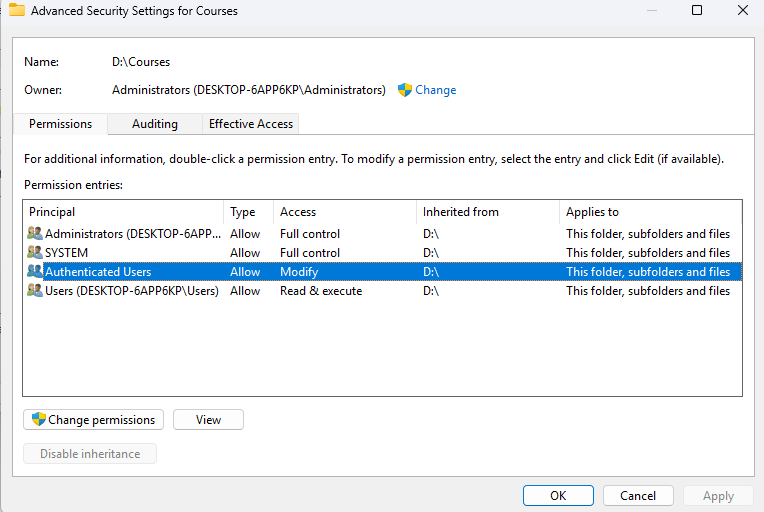
- The D:\Courses path is owned by Administrator but Authenticated Users can modify and the permission is inherit to its subfolders. This mean that when the application first installed, it required elevated privilege for the installation path and the service creation.
- The service is started as LocalSystem (NT SYSTEM)
- For the start privilege, this is quite weird and we can try to start it via services GUI
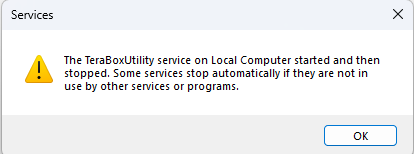
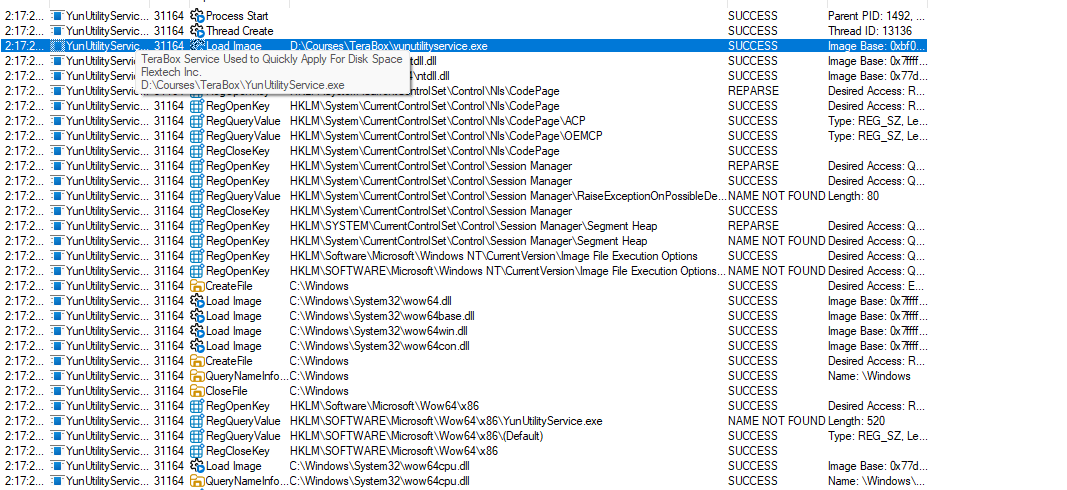
Well last piece of puzzle is not fit now, but obverving Procmon, the binary is executed anyway, and terminated right after few checks, but that should be enough.
At this point, I started crafting the exploit in some ways:
- First, to hijack the service, we can either replace the binary (D:\Courses\TeraBox\YunUtilityService.exe) or we can simply rename the folder TeraBox into something like TeraBox_old, and create our malicious TeraBox and put the PE in there.
- Then we can start the service, and watch the outcome.
After verifying this, I end up submit this to TeraBox but my TeraBox is old lol, the lastest version is already 1.40.0+ and then I download the lastest one and try to do the same and guess what, if the path starts with “C:", it will correctly validate the permission for weak folders, but if you put it on another drive, just like in my case with “D:", it will pass the check and we can put it anywhere just like what we just do. After I send them the report, they told me to send the screenshots, videos then ghost me lol, this was one of the applications that I look for LPE vulnerabilities, next blog might be something about IPC bugs because junction/symlink might be not as interesting.